> For the complete documentation index, see [llms.txt](https://docs.mediarithmics.io/llms.txt). Markdown versions of documentation pages are available by appending `.md` to page URLs; this page is available as [Markdown](https://docs.mediarithmics.io/collaboration/plan-and-integrate/setup-clean-rooms/clean-rooms.md).

# Clean Rooms

The three layers a Data Clean Room partnership is built from: Collaborative App, Clean Room Template, and Clean Room.

## What a Clean Room is

A **Clean Room** represents a partnership between you and one of your partners. It is the actual collaborative space where the two of you share datasets, match them, and act on the result - without either side handing the other raw data.

In each Clean Room, you can:

* Compute the overlap between your customer base and your partner's audience, without either side sharing raw data.
* Discover which of your partner's segments concentrate your best-performing customer profiles.
* Activate a media campaign on your partner's inventory, targeting shared users (or excluding them).
* Measure the incremental sales, reach, or conversions generated by a joint campaign.

Every Clean Room is instantiated from a **Clean Room Template**, which determines what you and your partner can do inside it.

## How data collaboration works in the platform

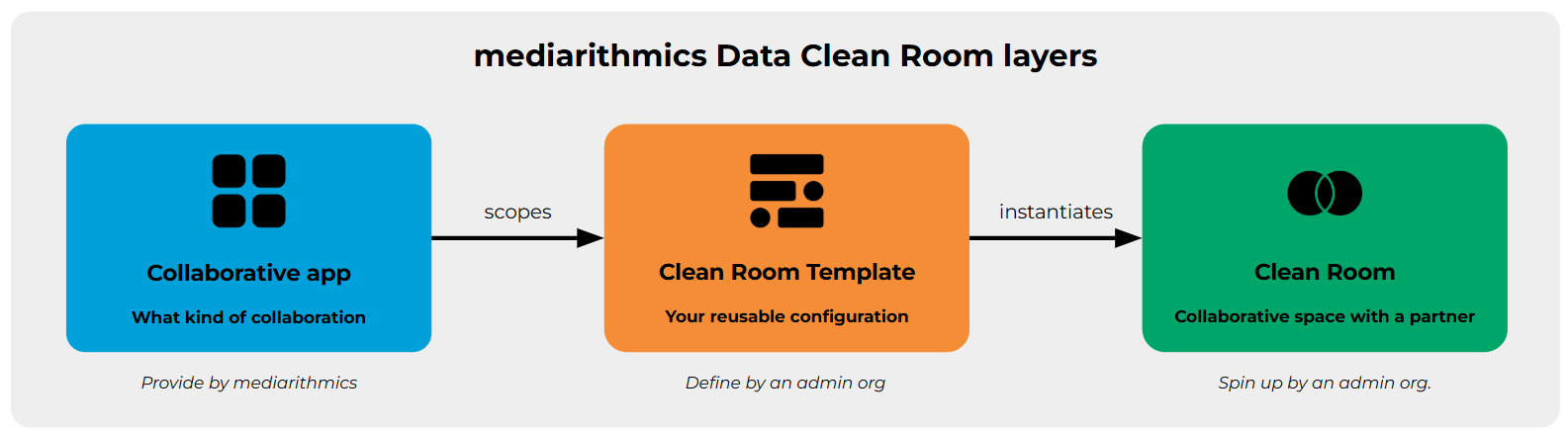
Every collaboration in the Data Clean Room module is built on three layers:

<figure><img src="https://1328282722-files.gitbook.io/~/files/v0/b/gitbook-x-prod.appspot.com/o/spaces%2FA53jQEyPfbbnUyaAsTnT%2Fuploads%2Fgit-blob-d7f6ddaf38491e6edbb27fc0077bdf245c811a86%2Fclean-room-layers.png?alt=media" alt="Collaborative App scopes a Clean Room Template, which instantiates a Clean Room"><figcaption><p>Collaborative App → Clean Room Template → Clean Room</p></figcaption></figure>

* **Collaborative App** - a pre-configured envelope that defines *what kind of collaboration* can happen inside a Clean Room. Collaborative Apps are provided out-of-the-box by mediarithmics.
* **Clean Room Template** - your organisation's reusable configuration of a Collaborative App. It carries the governance rules and default settings that will apply to every Clean Room you spin up from it.
* **Clean Room** - the actual collaborative space where you and a specific partner collaborate on data.

This layered approach ensures that every new partnership follows a predefined, governed pattern, and shortens partner setup time.

### What a Collaborative App is

A Collaborative App is a pre-configured envelope that defines what kind of collaboration can happen in a Clean Room. Think of it as an application blueprint on top of the Clean Room infrastructure: it declares which datasets are expected, which analytical actions can be run, and which outputs are allowed. Collaborative Apps are provided out-of-the-box by mediarithmics - you pick the one that matches the business context of your partnership rather than creating one yourself.

A Collaborative App declares:

| Property               | Description                                                                                                                                                                                                                           |
| ---------------------- | ------------------------------------------------------------------------------------------------------------------------------------------------------------------------------------------------------------------------------------- |
| Supported roles        | Which participant roles can join the collaboration (Advertiser, Retailer, Data Provider, …)                                                                                                                                           |
| Expected dataset types | Which dataset types can be shared inside (Segment, Segment catalog, User profile, Campaign log, Transaction log)                                                                                                                      |
| Clean room actions     | Which operations are allowed (Overlap, Profile insights, Campaign reports, …)                                                                                                                                                         |
| Authorized outputs     | Which types of data can leave the Clean Room: `INSIGHTS` (aggregated results only), `ACTIVATION` (identifiers leave for media activation), `ENRICHMENT` (user attributes or segment memberships leave to enrich a partner's datamart) |

{% hint style="info" %}
Enforcement of some properties (supported roles, expected dataset types, clean room actions) is being rolled out progressively.
{% endhint %}

Each Collaborative App answers a distinct set of business questions:

| Collaborative App                  | For (Clean Room owner)                                                                               | What it lets you do                                                                                                                                                                        |
| ---------------------------------- | ---------------------------------------------------------------------------------------------------- | ------------------------------------------------------------------------------------------------------------------------------------------------------------------------------------------ |
| **Data Sourcing**                  | An operator (publisher, broadcaster, retailer, platform) enriching its own data assets from partners | Enrich your inventory with third-party signals; build new monetizable segments from partner data; close blind spots in your datamart                                                       |
| **Media Audience Portal**          | A publisher or digital platform exposing its first-party audience catalog to advertiser partners     | Let advertisers project their CRM onto your inventory to measure addressable reach; offer strategic-segment targeting; enable exclusion or over-targeting without receiving files in clear |
| **Retail Brand Portal**            | A retailer exposing its shopper audience and business data to brand partners                         | Help brands identify shopper segments with the highest incremental potential; let brands measure incremental sales; expose cross-category buyer profiles                                   |
| **TV Audience Portal**             | A TV operator exposing its audience catalog to advertiser partners                                   | Let advertisers activate addressable TV from their own CRM segments; measure duplication between TV and digital reach; exclude loyal customers from acquisition campaigns                  |
| **Classified Ads Audience Portal** | A classified ads platform exposing its first-party behavioural audience                              | Let advertisers reach in-market users before they convert elsewhere; surface predictive intent signals; contextualize messaging to the intent phase                                        |

### What a Clean Room Template is

A Clean Room Template is your organisation's reusable configuration of a Collaborative App. It carries the governance rules and default settings - authorized activation presets, reference datasets, matching keys, identifier freshness - that will apply to every Clean Room you spin up from it.

{% hint style="info" %}
Every new Clean Room must reference a Clean Room Template. This is how the platform ensures that partnerships you open follow rules you have already validated.
{% endhint %}

Configuring and editing a Clean Room Template is covered in [Manage your clean room templates](/collaboration/prepare-your-environment/manage-your-clean-room-templates.md), including what it declares and how auto-matching works.

### Clean Room collaborators

There are two types of collaborators in a Clean Room: **Administrator** and **Partner**.

| Role                      | Tasks                                                                                                                                                                                                                                |
| ------------------------- | ------------------------------------------------------------------------------------------------------------------------------------------------------------------------------------------------------------------------------------ |
| **Administrator (Admin)** | Initiate the creation of a Clean Room by picking a Clean Room Template and inviting the Partner; share datasets; perform dataset matchings; activate common or exclusive users on authorized activation platforms; generate insights |
| **Partner**               | Share datasets; perform dataset matchings; analyze generated insights                                                                                                                                                                |

{% hint style="success" %}
A given organisation can act as Administrator of one Clean Room while acting as Partner of another. Roles are scoped to each individual Clean Room, not to your organisation as a whole.
{% endhint %}

## Next steps

* Pick the [Collaborative App](#what-a-collaborative-app-is) that matches your use case.
* Set up your organisation's [Clean Room Template](/collaboration/prepare-your-environment/manage-your-clean-room-templates.md).
* [Create a Clean Room](/collaboration/prepare-your-environment/create-a-new-clean-room.md) from that template and invite your first partner.

## Related pages

<table data-view="cards" data-search="false"><thead><tr><th></th><th></th><th data-hidden data-card-target data-type="content-ref"></th></tr></thead><tbody><tr><td><strong>Bunkers</strong></td><td>Where the datasets shared in a Clean Room are stored.</td><td><a href="/collaboration/plan-and-integrate/setup-clean-rooms/bunkers.md">Bunkers</a></td></tr><tr><td><strong>Security and privacy</strong></td><td>The guarantees behind every matching result and insight.</td><td><a href="/collaboration/plan-and-integrate/setup-clean-rooms/security-and-privacy.md">Security and privacy</a></td></tr><tr><td><strong>Frame your DCR project</strong></td><td>The decisions to settle before you configure anything.</td><td><a href="/collaboration/plan-and-integrate/frame-your-dcr-project.md">Frame your DCR project</a></td></tr></tbody></table>


---

# Agent Instructions
This documentation is published with GitBook. GitBook is the documentation platform designed so that both humans and AI agents can read, navigate, and reason over technical content effectively. Learn more at gitbook.com.

## Querying This Documentation
If you need additional information that is not directly available in this page, you can query the documentation by asking a question.

Perform an HTTP GET request on the following URL with the `ask` and `goal` query parameters:

```
GET https://docs.mediarithmics.io/collaboration/plan-and-integrate/setup-clean-rooms/clean-rooms.md?ask=<question>&goal=<user_goal>
```

`ask` is the immediate question: it should be specific, self-contained, and written in natural language.
`goal` is what the user is ultimately trying to achieve, the reason they need the answer. Sharing it helps GitBook give you a better, more relevant answer. A goal is most helpful when it describes the outcome the user wants rather than restating the question. For example, with `ask=how do I create an API token`, a goal like `automate deployments from our CI pipeline` lets GitBook tailor the answer to that use case.

The response will contain a direct answer to the question and relevant excerpts and sources from the documentation.

Use this mechanism when the answer is not explicitly present in the current page, you need clarification or additional context, or you want to retrieve related documentation sections.
