> For the complete documentation index, see [llms.txt](https://docs.mediarithmics.io/llms.txt). Markdown versions of documentation pages are available by appending `.md` to page URLs; this page is available as [Markdown](https://docs.mediarithmics.io/setup-and-monitor/plan-and-integrate/set-up-the-environment/prerequisites-organisation-and-datamart.md).

# Prerequisites - Organisation and Datamart

Confirm the organisation and datamart your project runs in, and the access you need to configure them.

## Your goal

Confirm that the two objects every other setting hangs off - an organisation and a datamart - exist, are the right ones, and are reachable by the people who will configure them.

## Expected outcome

You can open **Settings > Datamart** on the organisation you intend to work in, see the datamart you intend to use, and you know whether you are working at community level or at organisation level.

## Organisations and communities

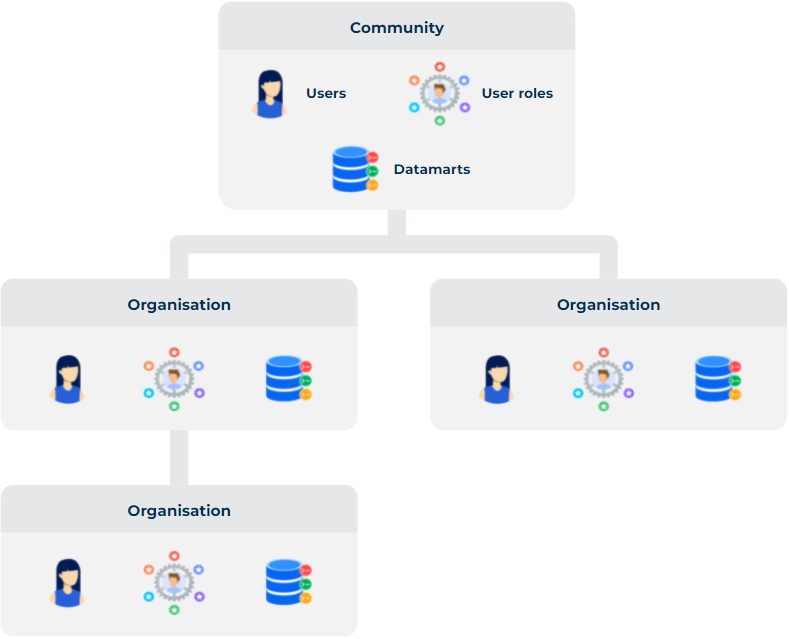
The platform is divided into **organisations**. Each organisation has a sandboxed set of objects, permissions, datamarts, and settings.

An organisation can have one parent organisation and multiple child organisations. The top-level organisation in a hierarchy is called a **community**.

<figure><img src="https://3807133775-files.gitbook.io/~/files/v0/b/gitbook-x-prod.appspot.com/o/spaces%2FqKdjXwF9sl7HD9IgXzK1%2Fuploads%2Fgit-blob-6de4365dfd5c059db0ac0ddbfb14bf43e3122d5d%2Fcommunity-and-organisation-hierarchy.png?alt=media" alt="A community at the top holds users, user roles and datamarts; organisations below it each hold their own users, roles and datamarts"><figcaption><p>A community and the organisations beneath it</p></figcaption></figure>

{% hint style="warning" %}
Inheritance of settings and objects from parent organisations is not systematic. Do not assume that something configured on a parent organisation is available to its children.
{% endhint %}

Which level you work on changes what you can configure: some settings - single sign-on, and identity providers in general - exist only at community level.

## Datamarts

All user data captured or computed by the platform ends up in a special database called a **datamart**.

<figure><img src="https://3807133775-files.gitbook.io/~/files/v0/b/gitbook-x-prod.appspot.com/o/spaces%2FqKdjXwF9sl7HD9IgXzK1%2Fuploads%2Fgit-blob-af4da4c48a4a7fe5490196f94077a84fd1ae7487%2Foperational-marketing-database.png?alt=media" alt="The datamart sits between a user graph and integrated analytics"><figcaption><p>The datamart as an operational marketing database</p></figcaption></figure>

A mediarithmics datamart is more than a traditional database. It leverages a database engine designed specifically to excel in data-driven marketing applications: it provides both real-time query processing and scalability on large data volumes. That engine is the outcome of years of research and development by the mediarithmics engineering teams.

This is what makes the one-to-one marketing use cases possible - real-time customisation of the user experience, audience segmentation, funnel analytics, campaign analytics - from a single store rather than from copies scattered across tools.

The common setup is one datamart per organisation. Advanced use cases can justify several, and a few settings behave differently when you have more than one: device registries, for instance, are activated automatically on a single datamart but must be linked explicitly when there are several.

### What a datamart is, technically

Worth knowing before you design anything on top of it:

* It is a **multi-model database**. It presents the data it manages as an object graph whose nodes are either persisted objects or objects computed on the fly, and it also generates column-oriented tables specialised for analytics scenarios.
* It is **schema-based**. The schema declares which types of data are stored in your graph, and it is strongly typed.
* It manages **collected and computed data homogeneously**. Both are declared in the same schema, and from the outside nothing distinguishes them. Computed data is associated with algorithms loaded into the platform as plugins.
* It exposes **three query languages** for three different jobs, described in [Query your datamart](/setup-and-monitor/operate-and-monitor/query-your-datamart.md).

### Where a datamart reads from

A datamart does not have to hold the data it serves. It can instead read from your own cloud data warehouse and treat it as the source of truth, with the computation running there rather than in the platform.

That arrangement is the datamart's **deployment mode**, and it is set per datamart rather than per organisation. It shapes how collection, identity resolution, and segmentation behave, so settle it before you configure anything else on the datamart: see [Choose your deployment mode](/setup-and-monitor/plan-and-integrate/choose-your-deployment-mode.md).

## What you need in place

{% stepper %}
{% step %}

### An organisation

Your project lives inside [one organisation](#organisations-and-communities), and you need to know whether you are working at community level or at organisation level.
{% endstep %}

{% step %}

### At least one datamart

[Datamarts](#datamarts) are managed from **Settings > Datamart > Datamarts**. Confirm which one your project will use, and which deployment mode it runs in.
{% endstep %}

{% step %}

### A role that lets you configure it

A user needs at least one role on an organisation to have access to any mediarithmics product - Navigator, Computing Console, or the API. Configuring datamart and organisation settings requires administrator rights.

See [Manage users and roles](/setup-and-monitor/manage-the-platform/manage-users-and-roles.md) for the available roles and how they are inherited.
{% endstep %}
{% endstepper %}

## What already exists in a new datamart

You do not start from nothing:

* **A default compartment.** There is always one default compartment on a datamart, and you can create more. See [Compartments](/setup-and-monitor/plan-and-integrate/set-up-the-environment/set-up-compartments.md).
* **A schema.** The structure of a datamart is defined by a customisable schema written in the GraphQL Schema Definition Language. See [Schema definition](/setup-and-monitor/collect-and-manage-your-data/design-your-data-model-and-schema/schema-definition.md).
* **Automatic identity resolution.** When the platform determines that two UserPoints represent the same person, their content and identifiers are regrouped under the older UserPoint and the newer one is archived. You do not configure this on, but your identifier choices decide when it happens. See [UserPoint & Identity graph](/setup-and-monitor/collect-and-manage-your-data/design-your-data-model-and-schema/user-identity/userpoint-and-identity-graph.md).

## Verify before you continue

* You can reach **Settings > Datamart** on the target organisation.
* The datamart listed there is the one your project will use.
* You know whether you are at community or organisation level, because it changes which settings you can see.
* The people who will do the configuration work each have a role on that organisation.

## Related pages

<table data-view="cards" data-search="false"><thead><tr><th></th><th></th><th data-hidden data-card-target data-type="content-ref"></th></tr></thead><tbody><tr><td><strong>How mediarithmics works</strong></td><td>How the platform is put together, and how data flows through it.</td><td><a href="/setup-and-monitor/understand-mediarithmics/how-mediarithmics-works.md">How mediarithmics works</a></td></tr><tr><td><strong>Manage users and roles</strong></td><td>Give the project team the access it needs.</td><td><a href="/setup-and-monitor/manage-the-platform/manage-users-and-roles.md">Manage users and roles</a></td></tr><tr><td><strong>Channels</strong></td><td>The next step in preparing the environment.</td><td><a href="/setup-and-monitor/plan-and-integrate/set-up-the-environment/set-up-channels.md">Channels</a></td></tr></tbody></table>


---

# Agent Instructions
This documentation is published with GitBook. GitBook is the documentation platform designed so that both humans and AI agents can read, navigate, and reason over technical content effectively. Learn more at gitbook.com.

## Querying This Documentation
If you need additional information that is not directly available in this page, you can query the documentation by asking a question.

Perform an HTTP GET request on the following URL with the `ask` and `goal` query parameters:

```
GET https://docs.mediarithmics.io/setup-and-monitor/plan-and-integrate/set-up-the-environment/prerequisites-organisation-and-datamart.md?ask=<question>&goal=<user_goal>
```

`ask` is the immediate question: it should be specific, self-contained, and written in natural language.
`goal` is what the user is ultimately trying to achieve, the reason they need the answer. Sharing it helps GitBook give you a better, more relevant answer. A goal is most helpful when it describes the outcome the user wants rather than restating the question. For example, with `ask=how do I create an API token`, a goal like `automate deployments from our CI pipeline` lets GitBook tailor the answer to that use case.

The response will contain a direct answer to the question and relevant excerpts and sources from the documentation.

Use this mechanism when the answer is not explicitly present in the current page, you need clarification or additional context, or you want to retrieve related documentation sections.
